
CSS Beautifier: Complete Guide to Formatting CSS Code Efficiently
CSS Beautifier: Complete Guide to Formatting CSS Code Efficiently
📑 Table of Contents
- CSS Beautifier: Complete Guide to Formatting CSS Code Efficiently
- What is a CSS beautifier (and what it is not)
- Why formatting CSS matters more than people admit
- Common signs you need a CSS beautifier (like, today)
- How CSS beautifiers work under the hood (quick but useful)
- Popular CSS beautifier tools (and when to use each)
- The formatting choices that actually matter (settings you should decide)
- A practical workflow: how to beautify CSS without wasting time
- Examples: messy CSS in, clean CSS out
- CSS beautifier vs minifier: when you use each
- Formatting CSS efficiently in real projects (not just snippets)
- Common gotchas and how to avoid them
- A simple recommended setup (the one that works for most people)
- When an online CSS beautifier is still the right choice
- Final thoughts
- FAQs (Frequently Asked Questions)
- What is a CSS beautifier and how does it differ from a minifier or linter?
- Why is formatting CSS properly important for developers and teams?
- What are common signs that indicate you need to use a CSS beautifier immediately?
- How do CSS beautifiers work behind the scenes to format messy code?
- What are popular types of CSS beautifier tools and when should each be used?
- How can using a CSS beautifier improve code quality and team productivity?
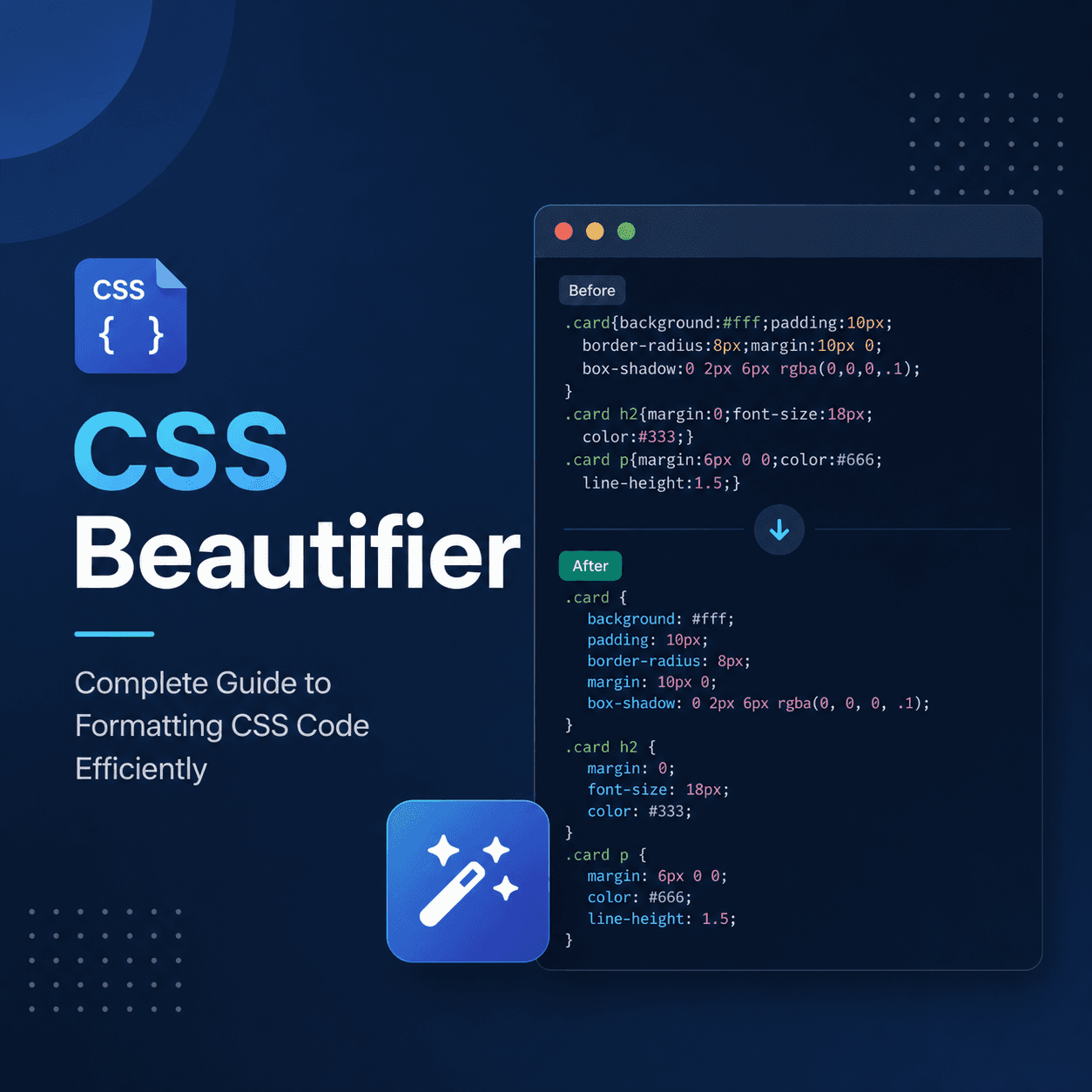
If you have ever opened a CSS file that looks like someone poured alphabet soup into a text editor. Yeah. That’s the moment you start caring about formatting.
CSS is already… a little too flexible. You can write it in one line, in 500 lines, with weird spacing, with no spacing, with comments in random places, with rules that are technically valid but spiritually upsetting.
A CSS beautifier fixes that. It takes messy CSS and reformats it into a consistent, readable style. No logic changes. No new features. Just. Clean.
And the funny part is, once your CSS is readable, you write better CSS. You spot duplication faster. You notice the “why do we have 14 !importants” problem faster. You stop shipping tiny crimes.
This is a complete guide. What a CSS beautifier is, how it works, how to use one efficiently, how to pick the right settings, and how to keep formatting from becoming a constant annoying argument inside your team.
What is a CSS beautifier (and what it is not)
A CSS beautifier is a formatter.
It reads your CSS, parses it, then prints it back out using a set of rules like:
- indentation style (2 spaces, 4 spaces, tabs)
- where braces go
- whether to put each declaration on a new line
- spacing after colons and commas
- how to format nested blocks like @media or @supports
- how to wrap long lines
It’s basically the opposite of a minifier.
- Beautifier: makes CSS readable for humans.
- Minifier: makes CSS small for machines and networks.
A beautifier is also not the same as a linter.
- A linter finds problems. Like invalid properties, duplicate declarations, risky patterns, or style violations.
- A beautifier just rewrites formatting. It might incidentally reorder something if it’s part of formatting rules (depending on tool), but it is not “fixing” your CSS logic.
That distinction matters because people often expect a beautifier to “improve” CSS. It improves readability. That’s the deal.
Why formatting CSS matters more than people admit
CSS is deceptively simple. And then you maintain it for 2 years.
Good formatting helps with:
1. Faster debugging
When rules are clean, you can scan and find the one property that’s overriding everything. When rules are jammed into one line or inconsistently spaced, your brain burns time parsing punctuation.
2. Cleaner diffs in Git
This one is huge.
If your formatting is inconsistent, your diffs become garbage.
A teammate changes color: #333 to #222 and the PR shows 40 lines changed because braces moved and indentation changed and now everything is rewrapped.
A beautifier with consistent settings prevents that. Diffs become real diffs.
3. Easier onboarding
New devs don’t just learn your code. They learn your code style. If style is random, it adds friction. People hesitate to touch CSS because it feels like a fragile pile.
4. More confidence doing refactors
Readable CSS is refactorable CSS. You see repeated patterns. You spot selectors that can be simplified. You notice a media query block that should be grouped.
Messy CSS hides problems.
Common signs you need a CSS beautifier (like, today)
If any of these feel familiar, yes, use a beautifier.
- one file mixes tabs and spaces
- some blocks use Allman braces (brace on new line) and others don’t
- declarations are sometimes one per line, sometimes one line per rule
- media queries are inconsistent, indentation is random
- you keep reformatting manually and still it looks off
- PRs contain huge formatting noise
- you have a “style guide” but no tool enforcing it
Formatting should not be a personality trait. Automate it.
How CSS beautifiers work under the hood (quick but useful)
Most formatters do roughly this:
- Tokenize and parse the CSS into an AST (abstract syntax tree), or at least a structured representation.
- Print it back out using formatting rules.
This is why beautifiers can handle nasty input like:
css .hero{color:red;background:#fff}@media (min-width:768px){.hero{color:blue}}
And output something like:
css .hero { color: red; background: #fff; }
@media (min-width: 768px) { .hero { color: blue; } }
They’re not doing find and replace. They’re actually understanding the structure.
Also, this is why broken CSS can break a formatter. If the parser can’t interpret it, it can’t format it. Some tools try to recover, some just fail.
Popular CSS beautifier tools (and when to use each)
There are a lot of “CSS beautifier online” pages. Those are fine for one offs. But for real work, you want something in your editor or your build process.
Here are the common categories.
1. Online CSS Beautifier tools
Good for quick cleanup. Bad for workflow.
Use these when:
- you pasted CSS from somewhere
- you’re cleaning a snippet
- you don’t want to install anything
Downsides:
- privacy risk if you paste proprietary code
- no automatic enforcement on save
- inconsistent settings across teammates
2. Editor built-in formatters
VS Code and other editors can format CSS, often through extensions.
Use these when:
- you want format-on-save
- you want consistent formatting while working
Downsides:
- different editors may format differently if not standardized
- settings need to be shared in the repo
3. Prettier (the real-world default)
Prettier is a general-purpose formatter that handles CSS, SCSS, Less, and more.
If your team already uses Prettier for JS, using it for CSS too is the simplest path.
Pros:
- consistent output, minimal bike-shedding
- integrates with editors and CI
- handles lots of file types
Cons:
- less customization than some dedicated CSS formatters
- you accept “Prettier style” largely as is
Still. In teams, that’s usually a feature, not a bug.
4. Stylelint (not a beautifier, but relevant)
Stylelint is a linter, but it can also auto-fix some formatting and style issues.
Use it when:
- you want formatting plus rules enforcement
- you care about conventions like property ordering, naming patterns, disallowing !important, etc.
A common setup is:
- Prettier for formatting
- Stylelint for CSS correctness and conventions
5. PostCSS formatting plugins
This is more niche.
If you already run PostCSS and want formatting as part of a transform pipeline, you can. But most teams don’t need this unless they have a special reason.
The formatting choices that actually matter (settings you should decide)
A beautifier is only “efficient” if it matches your workflow and doesn’t create churn.
These are the big decisions.
Indentation (2 spaces, 4 spaces, tabs)
For CSS, most modern teams go with 2 spaces. It keeps nesting readable without pushing code too far right.
Tabs can be fine too, but the reality is many repos prefer spaces for consistent rendering across tools.
Pick one. Enforce it. Stop thinking about it.
Brace style
Common style:
css .selector { property: value; }
Less common but still seen:
css .selector { property: value; }
Most formatters default to the first. Go with that unless you have a strong reason.
One declaration per line (usually yes)
This is the biggest readability win.
Bad:
css .btn{padding:10px 16px;background:#111;color:#fff;border-radius:8px}
Good:
css .btn { padding: 10px 16px; background: #111; color: #fff; border-radius: 8px; }
Spaces after colons and commas
You almost always want:
- color: red; not color:red;
- box-shadow: 0 1px 2px rgba(0, 0, 0, 0.2); with spaces after commas
Blank lines between rule blocks
This is personal, but also… not personal if you want scanning to be easy.
I like a blank line between blocks:
css .card { padding: 16px; }
.card__title { font-size: 18px; }
Sorting properties (careful)
Some tools can reorder properties alphabetically or by “group”.
This sounds nice until it creates diff noise, and until it breaks intentional grouping like:
css .button { display: inline-flex; align-items: center; justify-content: center;
padding: 10px 16px;
border: 1px solid transparent; border-radius: 8px;
background: #111; color: #fff;
transition: background 120ms ease; }
If a formatter rearranges that, you lose readability.
My recommendation: keep formatting and property sorting separate. Use Stylelint if you want ordering rules, and decide it consciously.
A practical workflow: how to beautify CSS without wasting time
Here’s the workflow that keeps you sane.
Step 1: Use format-on-save in your editor
You don’t want to remember to run a command. You want it to happen automatically, every time, the same way.
For VS Code, the pattern is:
- install Prettier
- set it as the default formatter
- enable “Format On Save”
And commit the settings into the repo so everyone shares them.
Step 2: Add a formatting command to your project
In package.json, something like:
json { "scripts": { "format": "prettier . --write", "format:check": "prettier . --check" } }
Now anyone can run formatting with one command. And CI can check it.
Step 3: Run formatting in CI (or pre-commit)
This is where “efficient” really shows up. You stop having PR comments like “can you format this file”.
Options:
- run npm run format:check in CI
- use a pre-commit hook (like Husky + lint-staged) to format staged CSS files
Pre-commit is great because it prevents messy code from ever landing.
Step 4: Only reformat what you touch (when inheriting legacy CSS)
This is a big one in older codebases.
If you run a beautifier on a massive legacy file, your PR becomes a formatting-only PR and it’s painful to review. Sometimes worth it, often not.
A reasonable approach:
- format files when you actively edit them
- or do one dedicated “formatting only” PR with zero behavior changes, then move forward with clean diffs
Just don’t mix formatting and logic changes in the same PR unless you enjoy chaos.
Examples: messy CSS in, clean CSS out
Here’s a typical mess:
css .container{max-width:1200px;margin:0 auto;padding:0 16px} h1,h2,h3{font-family:system-ui,Arial;font-weight:700;line-height:1.2} @media (min-width:768px){.container{padding:0 24px}.grid{display:grid;grid-template-columns:repeat(3,1fr);gap:16px}}
Beautified:
css .container { max-width: 1200px; margin: 0 auto; padding: 0 16px; }
h1, h2, h3 { font-family: system-ui, Arial; font-weight: 700; line-height: 1.2; }
@media (min-width: 768px) { .container { padding: 0 24px; }
.grid { display: grid; grid-template-columns: repeat(3, 1fr); gap: 16px; } }
Nothing “changed”. But now you can actually read it. And reading it is how you catch issues.
CSS beautifier vs minifier: when you use each
You usually do both, just at different times.
- Beautify in development. During writing, reviewing, debugging.
- Minify for production builds. For performance.
Most modern build tools handle minification automatically (Vite, Webpack, Next.js, etc). Beautifying is a developer experience tool. You do it earlier in the pipeline.
One more thing.
Do not beautify your production CSS bundle. That’s not the goal. Source code readable, output code small.
Formatting CSS efficiently in real projects (not just snippets)
Here’s where teams get stuck. They format, then they fight about formatting, then they stop.
A few rules that help.
Make formatting automatic, not optional
If formatting is a guideline, people forget. If it runs on save and in CI, it just happens.
Keep configuration in the repo
Use shared config files like:
- .prettierrc
- .editorconfig
- stylelint.config.js (if you use Stylelint)
This removes the “but my editor does it differently” problem.
Decide how you handle SCSS, Less, and CSS-in-JS
If you use:
- .scss files: ensure the formatter supports SCSS.
- CSS-in-JS (styled-components, emotion): Prettier can format those templates too, but you need the right setup.
- Tailwind: formatting still matters, but class ordering is a separate topic (Tailwind has its own formatting plugin ecosystem).
Point is, don’t only format .css and ignore everything else where CSS lives.
Agree on line length
Prettier uses a print width (often 80 or 100). For CSS, long values happen. Gradients, shadows, grid templates.
If your line length is too short, formatters will wrap aggressively and it can look weird. If it’s too long, you get horizontal scrolling.
Most teams land around 100 and call it done.
Be careful with formatting generated files
If CSS is generated, don’t format the generated output. Format the source.
Common examples:
- compiled CSS from Sass
- build output directories like dist/
- vendor CSS files you don’t maintain
Ignore those in Prettier and Git. Otherwise, you waste time formatting files you don’t own.
Common gotchas and how to avoid them
“My beautifier changed something”
Formatting tools should not change semantics, but edge cases exist.
Examples:
- removing or moving comments in a way that affects hacks (rare, but legacy CSS is wild)
- changing whitespace inside calc() or custom properties in a way that exposes a bug in older browsers (also rare now)
- rewriting values that are technically equivalent but trigger different behavior due to parsing quirks
If you’re working in a very old environment or with very weird CSS, test after mass formatting. Usually it’s fine. But don’t be careless with huge files.
“It keeps reformatting back and forth between machines”
This is typically:
- different formatter versions
- different configs applied
- editor uses built-in formatter, teammate uses Prettier
- line endings differences (CRLF vs LF)
Fix: lock formatter versions in package.json, commit config, and use EditorConfig.
“Prettier fights Stylelint”
If you use both, use them correctly.
- Prettier formats.
- Stylelint enforces rules.
If Stylelint is also trying to format in conflicting ways, you get a loop.
The usual fix is configuring Stylelint to work with Prettier, or disabling rules that conflict with Prettier formatting. There are standard configs for this in the ecosystem.
A simple recommended setup (the one that works for most people)
If you just want a clean, efficient approach without overthinking it.
- Use Prettier for formatting CSS (and everything else if you like).
- Enable format on save in your editor.
- Add format and format:check scripts.
- Optionally add Stylelint for CSS quality rules.
That’s it. You can be productive and stop thinking about spaces.
When an online CSS beautifier is still the right choice
Even if you have a full setup, online beautifiers still have a place.
- cleaning a snippet from a forum answer
- quickly inspecting minified CSS from a third-party site
- formatting a single block you don’t want to paste into your repo yet
- debugging a production CSS file (just be careful what you upload)
If the CSS is sensitive. Don’t paste it into random websites. Use local tools.
Final thoughts
A CSS beautifier is one of those boring tools that quietly saves you hours. Not because it’s fancy. Because it removes friction. It stops formatting from being manual labor. It makes your CSS readable, reviewable, less scary.
And once it’s in your workflow, you stop noticing it. Which is kind of the point.
If you want the practical takeaway.
- Pick a formatter (Prettier is the easiest default).
- Commit the config.
- Turn on format-on-save.
- Enforce it in CI or pre-commit.
After that, you can focus on the actual work. The selectors, the layout bugs, the real problems. Not whether there should be a space after a colon.
FAQs (Frequently Asked Questions)
What is a CSS beautifier and how does it differ from a minifier or linter?
A CSS beautifier is a tool that formats your CSS code into a consistent, readable style by applying rules like indentation, brace placement, and spacing. Unlike a minifier, which compresses CSS to reduce file size for machines and networks, a beautifier improves human readability without changing logic. It also differs from a linter, which detects problems or style violations; a beautifier only rewrites formatting without fixing CSS logic.
Why is formatting CSS properly important for developers and teams?
Properly formatted CSS enhances readability, making debugging faster as you can quickly identify overriding properties. It leads to cleaner Git diffs by preventing unnecessary formatting noise in pull requests, easing collaboration. Consistent formatting also simplifies onboarding new developers by reducing friction caused by random styles and increases confidence when refactoring by revealing patterns and potential simplifications.
What are common signs that indicate you need to use a CSS beautifier immediately?
Signs include mixing tabs and spaces within the same file, inconsistent brace styles (like mixing Allman braces with others), irregular declaration layouts (sometimes one per line, sometimes multiple), random indentation especially in media queries, frequent manual reformatting attempts that still look off, pull requests filled with formatting noise, or having a style guide without any tool enforcing it. These issues suggest automating formatting with a beautifier.
How do CSS beautifiers work behind the scenes to format messy code?
CSS beautifiers parse your code by tokenizing it into an abstract syntax tree (AST) or structured representation. They then print the code back out using predefined formatting rules such as indentation style and brace placement. This process allows them to handle even poorly formatted input accurately. However, if the CSS contains syntax errors that prevent parsing, the formatter may fail or try to recover depending on the tool.
What are popular types of CSS beautifier tools and when should each be used?
There are three common categories: 1) Online CSS beautifiers are great for quick one-off cleanups but pose privacy risks and lack workflow integration; 2) Editor built-in formatters (like those in VS Code) offer format-on-save convenience but require shared settings across teams; 3) Prettier is widely used for real-world projects as it supports multiple syntaxes including CSS and integrates well into build processes for consistent team-wide formatting enforcement.
How can using a CSS beautifier improve code quality and team productivity?
By standardizing CSS formatting automatically, beautifiers make code more readable and maintainable. This reduces time spent deciphering messy styles during debugging or reviews. Consistent formatting leads to cleaner version control diffs, minimizing merge conflicts and review overhead. It also fosters better team collaboration by removing subjective style debates and allowing developers to focus on writing quality CSS rather than worrying about presentation.